
सभी
FlightFeeder Antenna Replacement
Due to a defective batch of antennas shipped in late 2014 and 2015, it is necessary that you replace your antenna for optimal operation of your FlightFeeder.
| 1FlightFeeder Antenna Kit |
Verify antenna replacement kit contents
 |
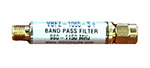
The filter is designed to optimize the ADS-B signal that the FlightFeeder receives.
 |
| 2Installing the Antenna |
- You will want to install the external antenna in an optimum location, as high as possible and away from obstacles that can block signals from aircraft. Obstacles can include other buildings, trees and high ground. While you will want to install the antenna outdoors, the FlightFeeder itself should remain indoors.
- Securely fasten the two washers as shown with the bottom two arrows.
- Securely fasten the nut shown with the top arrow.
- Repeat this for each of the four attach points and tighten each point to the diameter of your mounting pole as shown in the photo below.
- Mount the antenna by sliding it over your mounting pole.
- The coax cables are thick and to prevent signal loss you should avoid bending it.
- Connect coax cable to the antenna (as shown by the point in the photo below) and the other end to the FlightFeeder.


| 3Next Steps & More Information |
The coverage of your receiver should now be significantly improved. You can also view the receiver status through our ADS-B statistics portal.
We thank you for joining the FlightAware ADS-B network and remind you to contact us with any questions or comments.
